Pulse: A Display Font for Modern Web Design
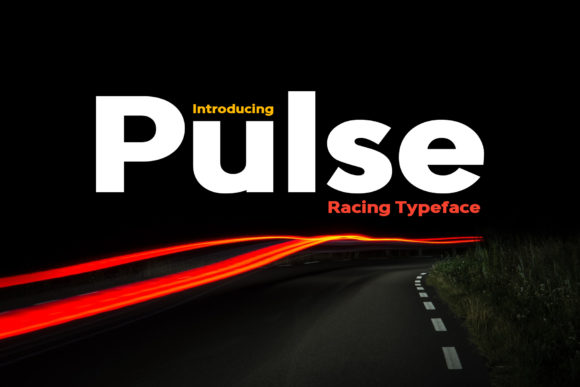
Pulse is a bold and simple display font that brings energy and clarity to any digital project. As a web designer, I've found that the right typeface can make or break a user experience. Pulse stands out for its clean lines, strong contrast, and versatile character set, making it ideal for a wide range of applications—from logos to hero sections, from banners to call-to-action buttons.
Visual Personality and Digital Appeal
Pulse’s visual personality is defined by its modern, geometric structure and confident stroke weight. It feels dynamic yet approachable, which makes it suitable for both high-energy and professional environments. The font's simplicity allows it to adapt easily to different design contexts without losing its identity. Whether used as a headline or a decorative accent, Pulse maintains a consistent tone that supports brand messaging.
One of the key strengths of Pulse is its readability. Despite being a display font, it performs exceptionally well in both light and dark backgrounds. This makes it a reliable choice for web layouts where clarity is essential. Its open letterforms and balanced spacing contribute to a natural flow that guides the reader's eye through content efficiently.
Applying Pulse in Web Design
Pulse is incredibly versatile when it comes to application. Here are some practical ways to use it in your digital projects:
- Hero Sections: Use Pulse for large, attention-grabbing headlines on landing pages or homepage banners. Its boldness ensures it stands out against background images or videos.
- Call-to-Action Buttons: The font’s strong presence works well with CTA text, encouraging users to take action without overwhelming them.
- Logo Text: Pulse’s clean design makes it an excellent choice for branding, especially for tech startups, creative agencies, or boutique businesses.
- Blog Headers: For online publications or personal blogs, Pulse adds a modern touch to article titles while maintaining readability.
- Online Store Banners: In e-commerce, Pulse can be used to highlight product names, promotions, or featured items with impact.
- Portfolio Sites: Whether it's a creative portfolio or a digital product showcase, Pulse helps establish a cohesive and professional look.
Its versatility extends beyond just text. Pulse can also be used as a decorative element in social media graphics, video editing overlays, or even in packaging design. When paired with complementary fonts, it creates a balanced typographic hierarchy that enhances user engagement.
Readability and Responsive Design
As a web designer, I prioritize readability across all screen sizes. Pulse performs well on mobile devices due to its clear letterforms and generous spacing. On small buttons or text overlays, it remains legible without sacrificing style. However, it’s important to test how Pulse looks in different contexts, especially when using it on dark backgrounds or image overlays. Proper contrast ratios ensure that the text remains accessible and easy to read.
When designing for responsive layouts, consider using Pulse in combination with a more readable body font. Pairing it with a sans-serif font like Roboto or Open Sans can create a visually appealing contrast while maintaining usability. This approach is particularly effective for editorial-style websites or content-heavy platforms.
Font Pairing and Brand Identity
Font pairing is a critical aspect of digital design. Pulse’s bold and modern aesthetic pairs well with both serif and sans-serif fonts, depending on the desired brand tone. For a more professional look, pair it with a classic serif font like Georgia or Times New Roman. For a contemporary feel, match it with a clean sans-serif such as Montserrat or Lato.
For brands aiming to convey creativity or innovation, Pulse can serve as the primary display font while a simpler sans-serif font handles body copy. This contrast not only improves visual hierarchy but also reinforces brand personality. It’s also worth noting that Pulse supports multiple languages, making it a great option for international projects or multilingual websites.
Commercial Licensing and Practical Considerations
When selecting a font for commercial use, licensing is crucial. Ensure that Pulse is available for web use and includes necessary styles, weights, and file formats. Most premium fonts offer webfont support via services like Google Fonts or Adobe Fonts, allowing you to integrate it seamlessly into your website or digital assets.
Before finalizing your design, check if Pulse offers alternates, ligatures, or special characters that may be relevant to your project. These features can enhance the overall design and provide greater flexibility in layout composition.
Whether you're building a landing page, launching a new product, or creating a brand kit, Pulse offers a powerful tool for shaping your digital identity. Its balance of style, readability, and adaptability makes it a valuable addition to any designer’s toolkit.